
KB Editor
Professional VS Code editor built specifically for GeneXus developers.
IntelliSense, visual editors for web forms, Win Forms, report layouts and patterns, specify and compile from the editor, AI-assisted development, and offline licensing — all in one.
Why KB Editor?
GeneXus is a powerful low-code platform for enterprise applications, but its native IDE hasn't evolved at the pace of modern development tools.

Closed IDE
You're forced to use GeneXus's proprietary IDE to edit code.
Limited IntelliSense
Basic autocomplete that doesn't understand code context.
No real-time validation
Errors only surface when you compile.
Poor navigation
No Go-to-Definition, Go-Back, or reliable symbol search.
No AI integration
Generic AI tools don't understand GeneXus syntax.
Isolated workflow
No Git, terminals, extensions, or integrated team tools.
KB Editor solves all of this by bringing the GeneXus development experience to VS Code — the editor used by more than 50% of professional developers worldwide.
What is KB Editor?
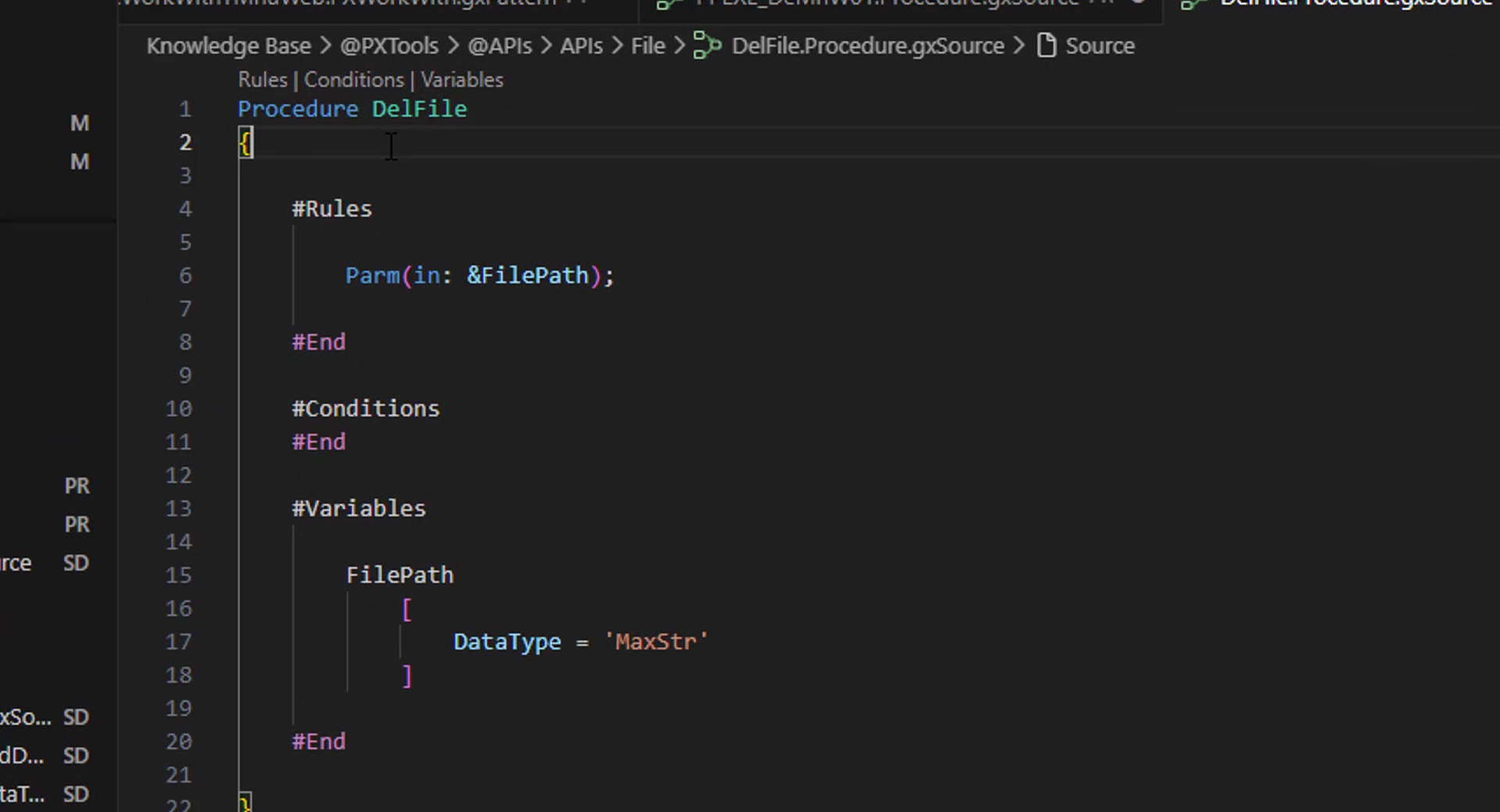
KB Editor is a professional VS Code editor with built-in GeneXus extensions and AI-powered documentation search. It's not a generic plugin — it's a complete editor purpose-built for GeneXus development, available on Windows, macOS and Linux.
File Explorer, Terminal, Git, Themes, Extensions, Remote Development, Live Share, Debugging
IntelliSense · Syntax Analysis · Semantic Validation · Controller · Visual Editors (Web Forms, Win Forms, Report Layouts, Patterns, File attachments) · GX Properties · Icon Theme · Sync & Builds
46,750 doc sections · 8 GeneXus versions (v9-v18) · 24,864 image descriptions · Works 100% offline · Semantic search
Use any AI as your development engine
KB Editor is compatible with every LLM and AI coding tool on the market. Install the plugin of your choice and start developing with artificial intelligence — right inside the editor.
Claude
Anthropic
ChatGPT / Copilot
OpenAI
Cursor
Cursor AI
Gemini
Plugin & Play
AI + GeneXus Docs
The build closes the loop
No vendor lock-in
Core Features
Every feature was designed so GeneXus developers work faster, with fewer errors and with modern tooling.
1. Smart Autocomplete (IntelliSense)
KB Editor understands GeneXus at a deep level. Its Language Server provides context-aware suggestions.
| Context | What you get |
|---|---|
| You type & | Every variable declared in the current file |
| You type an object name | All KB objects: Procedures, Transactions, WebPanels, WebComponents, DataProviders, SDTs, External Objects, APIs |
| You type Object. | .Call(), .Udp(), .Create(), .Link(), .Submit() with full parameter signatures |
| You type &variable. | Data-type-specific methods (e.g. .ToUpper(), .Trim() for Character) |
| You type &sdt. | SDT fields with nested level navigation and collection methods (.Add(), .Count(), .Item(N), .CurrentItem()) |
| You type Domain. | Enumerated values first, then domain methods |
| You type Module. | Object search within the module, with nested module support |
Parameter signature help: When calling procedures, KB Editor shows the expected parameters with direction (in:, out:, inout:) and types — extracted directly from the target object's Parm() rule. It also recognizes GeneXus built-in variables (&Mode, &Pgmname, &Today, &RestCode) with their real type.
2. Go to Definition and Navigation
Go to Definition (F12)
Go Back (Ctrl+Shift+←)
Quick Search (Ctrl+Shift+Space)
Find All References
Source ↔ Form in one click
Informative hover
3. Real-Time Code Validation
Three complementary systems catch errors as you type:
| System | What it catches | Technology |
|---|---|---|
| Syntax Analyzer | Misspelled keywords, invalid grammar, unclosed blocks | ANTLR 4 parser |
| Semantic Validator | Non-existent methods, wrong parameter count, invalid types, undeclared variables, SDTs missing their module | Type resolution engine |
| Section Validator | Commands used in the wrong sections (e.g. If in #Variables) | Per-section rules |
All validation runs in real time with configurable debounce — no need to compile to find errors. The catalog updates incrementally: a new Domain, Attribute, SDT or External Object — created by you, by an AI, or by externalizing a module — is recognized on the next save, with no window reload.
4. Visual Web Form Editor
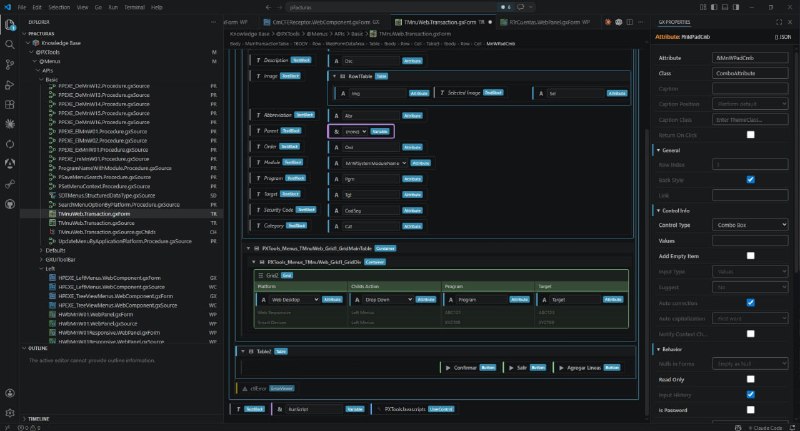
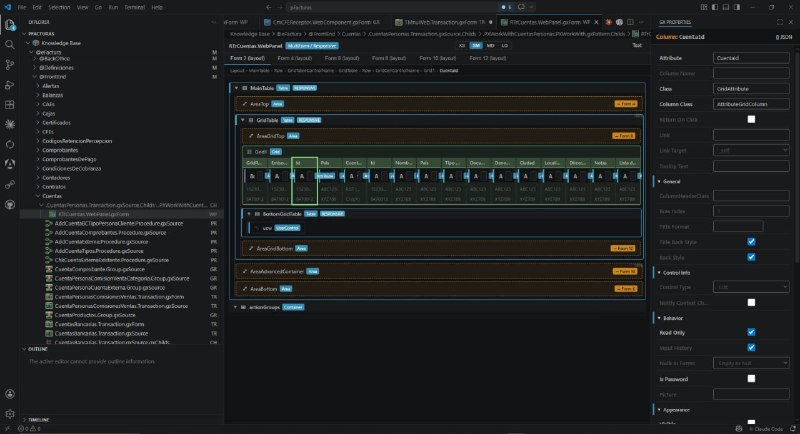
.gxForm files open in a visual editor that renders the form the way you see it in the IDE, covering all three GeneXus formats: HTML, Abstract Layout and MultiForm.
WYSIWYG rendering
Drag & drop and clipboard
Toolbox with real User Controls
Visual Responsive Sizes
Multi-layout for Smart Devices
Show Rows / Show Cells
Full Control Info
Dynamic forms protected
5. Visual Win Form EditorNew
GeneXus still supports Work Panels and the Windows Form of a Transaction, but the modern IDE no longer lets you create them. KB Editor externalizes them as .gxWinForm and edits them visually, with a byte-for-byte round-trip back to the Knowledge Base.
Work Panel as a first-class object
The form is drawn, not read as XML
Move, resize, align
Toolbox of Windows controls
Grid columns and tab pages
The properties the designer shows
Byte-for-byte round-trip
Multi-generator and dynamic forms
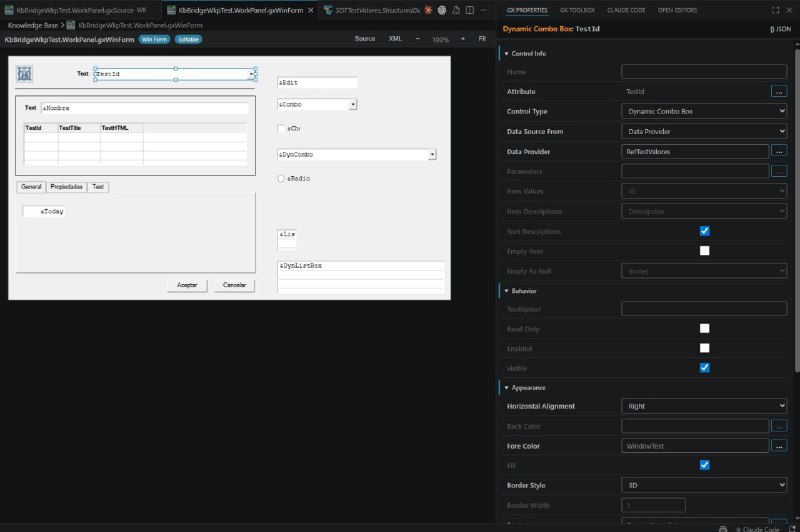
The Win Form editor requires KB Sync Engine v1.7.6 or later (v1.7.6.1+ for the Work Panel's full property set). Why it matters: the screens of a legacy Windows system become text an AI can read and edit — the real starting point for Windows-to-Web migrations with an assistant that understands the original screens.
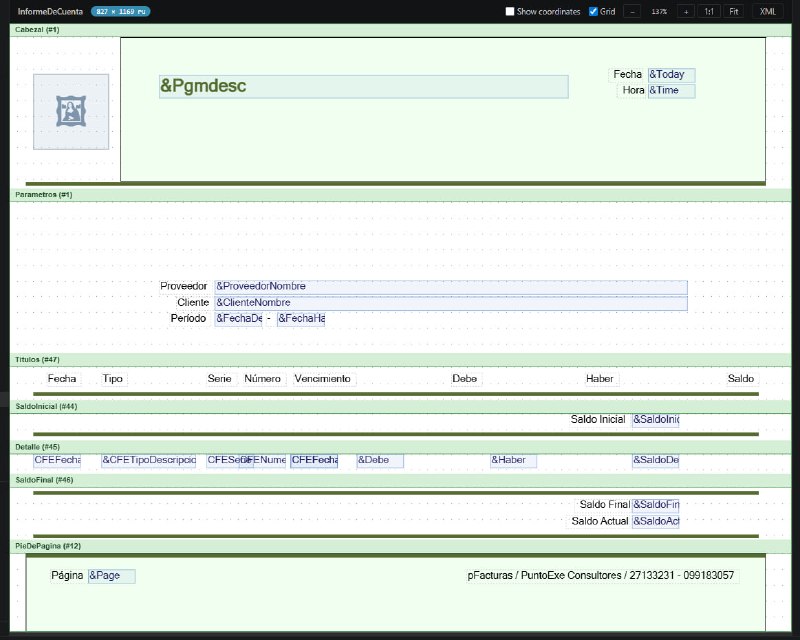
6. Visual Report Layout Editor
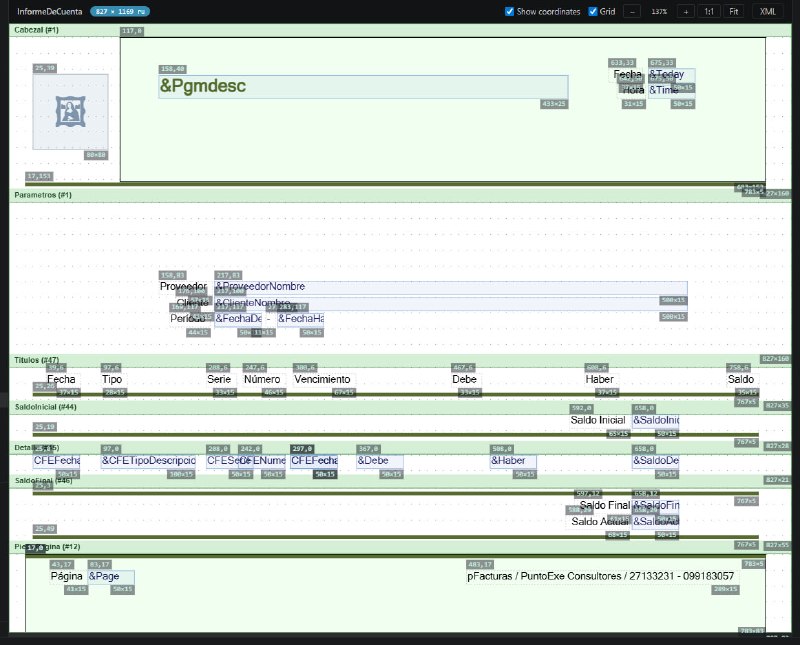
Procedures with printed output externalize their layout as a .gxLayout file, and KB Editor edits it visually, band by band.
PrintBlocks on paper
Copy between bands
Properties and keyboard
Synced like any source
7. Visual Pattern Editor
Interactive tree with icons
Inline editing
External-change diff
Find bar (Ctrl+F)
Full synchronization
Extensible
8. GX Properties Panel
A dedicated side panel showing the real GeneXus properties of the selected element, with hierarchical categories, collapsible groups, per-property visibility rules and type-aware editors. Complex properties are no longer read-only: Values opens the two-column editor, Item Values and Instantiated Attributes the attribute picker, Conditions and a Data Provider's parameters the code editor, and Font the font editor.
Object properties, filtered by the KB's GeneXus version
DataType, Length, Decimals, Collection, enumerated values, validation
Descriptions, types, default values, control properties
Level navigation, collections, property editing
Tables, rows, cells, grids, columns, tabs, buttons, images, User Controls
Buttons, data fields, combos, radio buttons, grids and tabs, with the properties from the Engine's catalogue
Pattern-specific properties with custom editors
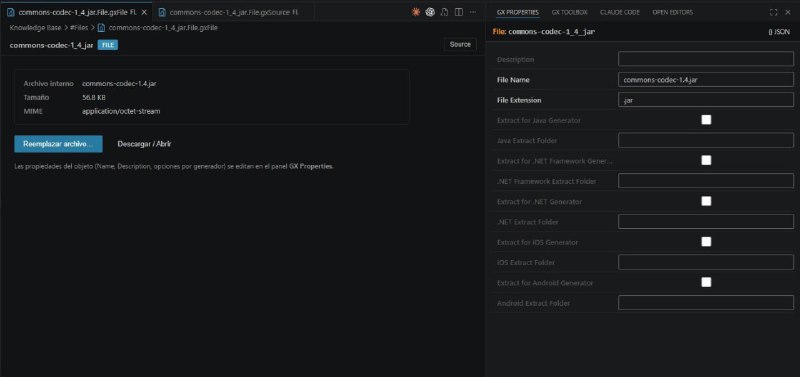
Name, description, extension and per-generator extraction options
9. Specify, Generate and Compile without leaving the editor
With KB Sync Engine running, KB Editor requests the full GeneXus cycle from the context menu of any .gxSource or .gxPattern — even across several objects at once.
Four commands
Builds tab
Errors in the Problems panel
Navigations tab
Environment and Build All
Automatic builds
Reorg pending
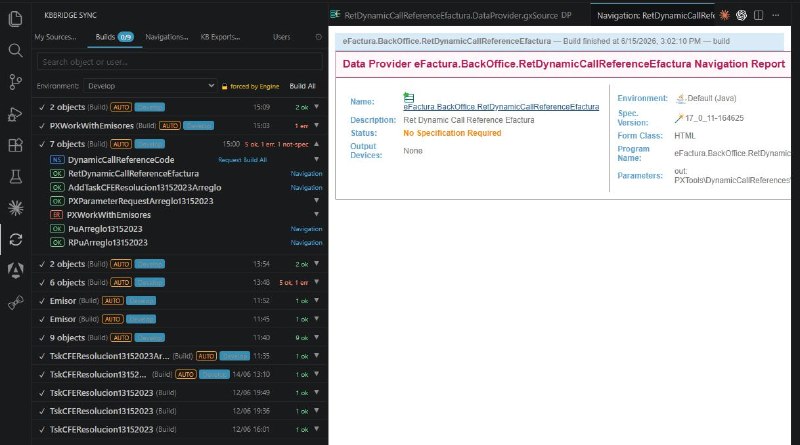
The build pipeline requires KB Sync Engine v1.5.6 or later. With an older engine, KB Editor hides these controls and keeps working normally.
10. Professional Icon Theme
Instant visual identification of GeneXus object types in the Explorer:
| Icon | Object Type |
|---|---|
| TR | Transaction |
| PR | Procedure |
| WP | WebPanel |
| WC | WebComponent |
| DP | DataProvider |
| DS | DataSelector |
| SD | Structured Data Type |
| WK | Work Panel (Win Form) |
| FL | File (attachment) |
| A | Attribute |
| D | Domain |
| M | Module |
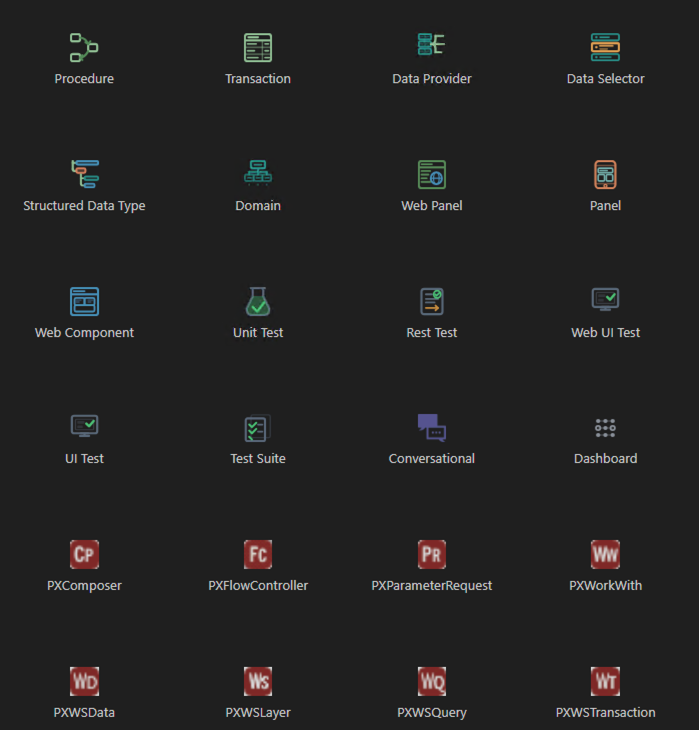
11. KB Synchronization Status
Visual panel
Per-developer tracking
Sibling files included
Skipped saves, with the reason
Move and rename as one change
Reconciliation
Conflict detection
Discard a failed import
Configurable
Extension Modules
KB Editor includes 8 purpose-built extensions that work together as a unified development environment.
GeneXus Language Core
The intelligent foundation that powers every other module.
- ✦Instant Knowledge Base indexing at startup — O(1) lookups by name
- ✦Go to Definition (F12) — jump to any object, attribute, domain or external object
- ✦Go Back navigation — 50-position history (Ctrl+Shift+←)
- ✦Quick Search — fuzzy search across all objects (Ctrl+Shift+Space)
- ✦Find All References and Find Referenced — from the context menu or the palette
- ✦One-click navigation between a .gxSource and its .gxForm or .gxLayout
- ✦Hover information — type, module, parameter signature and file location
- ✦GeneXus keyword filtering — ignores language keywords in lookups
- ✦Built-in function recognition — iif, Str, Trim, Today, etc.
- ✦Cache reindex and cache status commands from the command palette
GeneXus Language Analyzer
Real-time syntax analysis — catch errors instantly.
- ✦ANTLR 4 parser — complete GeneXus grammar (200+ rules) with configurable debounce
- ✦Instant feedback — red squiggles appear under syntax errors without compiling
- ✦Every object type recognized on line 1: Procedure, Transaction, WebPanel, WebComponent, WebMasterPage, Panel, WorkPanel, DataProvider, DataSelector, SDT, External Object, API, Group, Table and File
- ✦Protected section detection — auto-generated code decorated and protected
- ✦Complete language coverage — control flow, events, rules, database, native code
- ✦Continuous auditing against real KBs to eliminate false positives
- ✦Configurable limits — maximum diagnostics per file (default: 100)
GeneXus Language Validator
Semantic intelligence — it knows what's valid before you compile.
- ✦Method validation — verifies methods exist on the target type
- ✦Parameter validation — count, types and direction (in:, out:, inout:)
- ✦Built-in function validation — 40+ native functions with type checking
- ✦Undeclared variable detection — with a Quick Fix to add the declaration
- ✦Built-in variables recognized with their real type (&Mode, &Pgmname, &Today, &RestCode)
- ✦Data type validation — mismatches in assignments and calls
- ✦Deep SDT validation — nested levels, collections and items, honoring the declared module
- ✦Warning when an SDT is referenced without its module, with the suggested fix
- ✦Incremental validation — only re-validates changed lines, and recognizes new types without a window reload
GeneXus Language Controller
Automatic change propagation — edit once, sync everywhere.
- ✦Attribute property sync — propagates changes to every object using the attribute
- ✦Automatic variable sorting — the #Variables section is sorted alphabetically on save
- ✦Safe propagation — only syncs properties that actually changed
- ✦Team consistency — removes the manual overhead of updating definitions across dozens of files
GeneXus Language Server (LSP)
IntelliSense that understands GeneXus — 3,000+ methods at your fingertips.
- ✦Context-aware autocomplete — different suggestions depending on what you type
- ✦Parameter signature help — floating panel with names, types and direction
- ✦Hover documentation — signature, return type and description
- ✦3,000+ built-in method definitions — every GeneXus type documented
- ✦External Object support — full IntelliSense parsed from the externalized files
- ✦Collection intelligence — recognizes Collection<T> patterns
- ✦Client/server architecture — the Language Server runs in a separate process
GeneXus Visual Editor
Edit forms, Win Forms, layouts, patterns and attachments visually — no XML required.
- ✦Visual web form editor (.gxForm) for all three formats: HTML, Abstract Layout and MultiForm
- ✦Visual Windows Form editor (.gxWinForm) for Work Panels and Transactions, with a byte-for-byte round-trip
- ✦Visual report layout editor (.gxLayout) with PrintBlock bands
- ✦Interactive visual tree for .gxPattern files, with per-node icons and external-change diff
- ✦Toolbox with native controls and external User Controls, rendered from their design XSL
- ✦Responsive Sizes editor with XS/SM/MD/LG scales and live preview
- ✦Dedicated GX Properties panel with type-appropriate editors and visibility rules
- ✦Binary editor for .gxFile attachments — replace, download or open the attached file
- ✦Inline code editing with full IntelliSense
- ✦Wizard to create new GeneXus objects (Ctrl+Shift+N)
- ✦Save Object As — clone any object under a new name, copying its sibling files
- ✦Toggle to text/XML view at any time
- ✦Extensibility — third-party plugins can register custom editors and icons
GeneXus Sync Status & Builds
Team awareness and build control — know who edits what and what compiles.
- ✦Multi-developer tracking — tabbed side panel
- ✦Specify / Specify + Generate / Build / Build Called commands on one or many objects
- ✦Builds tab with live status, per-object badges and per-request output
- ✦Build errors published as native diagnostics in the Problems panel
- ✦Navigations tab with the navigation report per object and environment
- ✦Environment selector, Build All, and automatic builds filtered per user
- ✦Builds cancelled by a pending reorganization labelled 'Reorg pending', with Retry
- ✦Intentionally discarded saves visible with their reason (opt-in from Sync Settings)
- ✦Real-time file watching — detects changes even from external tools
- ✦Move/rename detection as a single change, carrying its previous path
- ✦Reconciliation — on-demand or periodic scan for external changes
- ✦Conflict detection — warns about merge conflicts in tracked files
- ✦Discard a failed internalization with re-export from the KB
- ✦Configurable retention — automatic cleanup (default: 7 days or 500 entries)
GeneXus Icons
Professional Explorer — recognize object types at a glance.
- ✦14+ custom icons covering every GeneXus object type
- ✦Icons per file type — .gxSource, .gxForm, .gxWinForm, .gxLayout, .gxPattern, .gxFile, etc.
- ✦Activates automatically when a GeneXus workspace is opened
- ✦Minimalist design with transparent backgrounds and colored vectors
AI-Assisted Development
Generic AI tools know almost nothing about GeneXus. They invent syntax, non-existent methods, and give advice that doesn't work. KB Editor solves this with a local knowledge base.
The Solution: Built-in AI Knowledge Base
KB Editor includes a local MCP server with the complete GeneXus documentation (versions 9 through 18) as a vector database. Any AI tool that supports MCP can query it for precise GeneXus information.
search_docsSemantic Search
Ask anything about GeneXus in natural language. Filter by version, object type and language.
lookup_methodMethod Reference
Look up methods and properties of any GeneXus type instantly. 1,080+ method definitions.
list_topicsExplore Content
Browse what's in the knowledge base: counts per version, type distribution, languages.
What it makes possible
Precise answers
Per version
Code generation
Errors back to the AI
Windows-to-Web migration
Accelerated learning
100% offline
Assisted testing
Database Statistics
| Metric | Value |
|---|---|
| Total documentation chunks | 46,750 |
| Image descriptions (vision model) | 24,864 |
| GeneXus versions covered | 8 (v9, v11, v12, v13, v15, v16, v17, v18) |
| Object types indexed | 19 |
| Languages | English, Spanish |
| Embeddings model | all-MiniLM-L6-v2 (384-dim, ONNX, offline) |
| Database engine | LanceDB (embedded, serverless) |
KB Editor vs Alternatives
See how KB Editor compares to the alternatives.
KB Editor vs Native GeneXus IDE
| Feature | GeneXus IDE | KB Editor |
|---|---|---|
| IntelliSense | Basic autocomplete | Full context-aware: variables, objects, methods, SDTs, domains |
| Go to Definition | Basic navigation | F12 with recursive type resolution |
| Code validation | Errors at compile time | Real-time ANTLR parser + semantic validation |
| Navigation | Limited | Go-Back stack, fuzzy search, Find All References, breadcrumbs |
| Web form editing | IDE editor | Visual WYSIWYG editor with GX Properties and Responsive Sizes |
| Work Panels and Win Forms | The modern IDE no longer lets you create them | Full visual editor with a byte-for-byte .gxWinForm round-trip |
| Report layouts | IDE editor | Visual PrintBlock editor on versionable text files |
| Pattern editing | Text/XML | Visual editor with properties panel, diff and search |
| Specify / compile | Inside the IDE | From the editor via KB Sync, with errors in the Problems panel and Navigation Report |
| AI assistance | None | Built-in MCP with complete GeneXus docs |
| Version control | External tools | Integrated Git (stage, commit, diff, blame, PR) |
| Terminal | External | Integrated terminal with multiple tabs |
| Themes | Fixed | Hundreds of themes (dark, light, high contrast) |
| Extensions | Limited ecosystem | Full VS Code/Open VSX marketplace |
| Remote development | Not supported | VS Code Remote, SSH, WSL, containers |
| Collaboration | Manual | Live Share, Pull Requests, code review |
| Platform | Windows only | Windows, macOS (Apple Silicon and Intel), Linux |
KB Editor vs generic VS Code
| Feature | VS Code (base) | KB Editor |
|---|---|---|
| GeneXus syntax highlighting | No | Yes — every file type |
| GeneXus IntelliSense | No | Yes — variables, objects, methods, SDTs, domains |
| GeneXus code validation | No | Yes — ANTLR parser + semantic analysis |
| Visual form and layout editors | No | Yes — .gxForm and .gxLayout with WYSIWYG rendering |
| Visual Win Form editor | No | Yes — .gxWinForm of Work Panels and Transactions |
| Visual pattern editor | No | Yes — visual tree with properties panel |
| Specify / generate / compile | No | Yes — build pipeline via KB Sync Engine |
| GeneXus icon theme | No | Yes — one icon per object and file type |
| GeneXus AI knowledge base | No | Yes — 46,750 chunks across 8 versions |
| GeneXus method lookup | No | Yes — 1,080+ structured methods |
| KB sync tracking | No | Yes — per-developer tracking |
| Pre-configured and ready | No (requires finding/installing extensions) | Yes — works out of the box |
GeneXus Format Support
KB Editor recognizes and provides full language support for every GeneXus file type.
| File Type | Extension | KB Editor support |
|---|---|---|
| Source Code | .gxSource | Syntax highlighting, IntelliSense, validation, outline, build |
| Child Objects | .gxChilds | Auto-reveal of hidden folders, navigation |
| Web Forms | .gxForm | Visual WYSIWYG editor (HTML, Abstract Layout, MultiForm) |
| Windows Forms | .gxWinForm | Visual Win Form editor for Work Panels and Transactions, with a byte-for-byte round-trip |
| Report Layout | .gxLayout | Visual PrintBlock editor with paper-relative positioning |
| Domains | .gxDomain | Enumeration editing, type resolution |
| Attributes | .gxAttribute | Description and type editing |
| Patterns | .gxPattern | Visual editor, properties panel, diff, build |
| Attachments (File) | .gxFile | Binary editor: name, size, type, replace, download or open |
| Code Blocks | .gxCode | Full language support |
Language Support
KB Editor's ANTLR parser supports the complete GeneXus language.
Control Flow
If/Else/EndIf, For/EndFor, While/EndDo, Case/EndCase, Do/EndDo
Events
Event/EndEvent, Start, AfterTrn, BeforeValidate, AfterValidate
Database
For Each, New/EndNew, Insert, Update, Delete, Commit, Rollback
Communication
Call, Msg, Error, Confirm, Return, Exit
Rules
Parm, Default, Error, Msg, Prompt, NoPrompt, Order
Sections
#Source, #Rules, #Events, #Conditions, #Variables, #Parameters
Operators
Arithmetic, Logical, Comparison, Assignment, Concatenation
Native Code
JAVA, CSHARP, DBASE embedded blocks
Reports
Print, MB, Eject, PrintBlocks
Testing
UnitTest, RestTest, WebUITest, UITest, TestSuite
Object Types
Procedure, Transaction, WebPanel, WebComponent, WebMasterPage, Panel, WorkPanel, DataProvider, DataSelector, SDT, ExternalObject, API, Group, Table, File
Technical Specifications
| Component | Detail |
|---|---|
| Base Editor | VS Code (latest stable, automatic tracking) |
| Build System | VSCodium (open-source VS Code build) |
| Platforms | Windows (x64), macOS (Apple Silicon and Intel), Linux (x64) |
| Installer Size | ~121 MB (Windows user setup) |
| Extensions | 8 proprietary built-in + unlimited from Open VSX |
| Language Server | TypeScript LSP with client/server architecture |
| Parser | ANTLR 4 grammar (200+ rules) |
| Type Resolution | Recursive: Variable → Attribute → Domain → Base Type |
| AI Database | 46,750 chunks, 165 MB, LanceDB |
| Embeddings Model | all-MiniLM-L6-v2, 384-dim, ONNX/WASM with automatic fallback |
| Build Pipeline | Requires KB Sync Engine v1.5.6+ (GeneXus XEv1 to 18) |
| Win Form Editor | Requires KB Sync Engine v1.7.6+ (v1.7.6.1+ for the Work Panel's full property set) |
| Encryption | AES-256-GCM (NIST approved) |
| Key Derivation | HKDF-SHA256 (NIST SP 800-56C) |
| License Signing | Ed25519 (deterministic, 128-bit security) |
| CI/CD | GitHub Actions (automated cross-platform builds) |
Where GeneXus meets modern development
For developers
Faster code with IntelliSense, errors before compiling, visual editors for forms and layouts, and compilation without leaving the editor.
For teams
Integrated Git, code review, remote development and collaboration tools the GeneXus ecosystem never had.
For organizations
Offline capability, Windows, macOS and Linux, a modern platform that attracts and retains talent, and tooling that scales with your team.
For the ecosystem
A bridge between GeneXus's powerful 4GL platform and the modern tools today's developers expect.